
Guide 13 / 16
Scenes
Sixteen slots. A scene holds the sound, the latched drones, GLINT’s arpeggio and its sequence, and the bass’s note and its sequence.
Play: load · Save + REC: store
Storing and loadingLink to this section
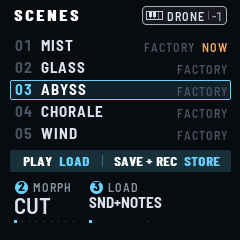
Press SAVE for SCENES; SAVE again goes back to the page you came from. The page lists five lines around the one K1 picks (framed in ice; SELECT scrolls it the same way, both ways, and leaves KEYS as they are; a page button held with it still turns that button’s pages): NEW SHARD first, then the sixteen slots, each its number, its name and what it holds (what it plays, FACTORY, EMPTY; a long name takes its room), NOW by the one loaded. Under them, in a box of their own, the page’s two actions: PLAY LOAD, SAVE + REC STORE. K2 and K3 are MORPH and LOAD.
NEW SHARD, above slot 01 (turn K1 below slot 1): not a slot, a sound to start a new shard from (see below). Its line has a plus for a number and says START FRESH; K1 on it, it is framed in lamp, and the box says PLAY LOAD alone: nothing is stored into it. PLAY loads it as any scene; it is then the current scene: the play page’s header says NEW SHARD, SAVE lights while the sound differs from it, COMPARE plays it.
Load: on SCENES, PLAY loads the slot K1 points at. On any page, hold SAVE and press a white key: the 16 white keys are the 16 scenes, F2’s key the first. That key sounds nothing, and the page stays. While SAVE is held, the white keys light: the current scene’s bright, the slots that hold a scene faintly. MIDI Program Change loads them too (see MIDI). Every load comes in as MORPH and LOAD say.
Store: hold SAVE and press REC: the sound goes into the slot K1 points at on SCENES, into the current scene anywhere else (STORED 03 ABYSS), with the latched drones (up to 8 chords), GLINT’s arpeggio notes and its sequence, and the bass’s note and its sequence (with its SEQUENCE, STEPS and TRANSPOSE). Into a free slot (9 to 16) with a drone preset on, the scene takes the preset’s name; else it is SCENE and its number. With K1 on NEW SHARD, nothing is stored (STORE CHOOSE A SLOT). NEW SHARD loaded, STORE from another page goes into the first EMPTY slot (9 to 16; a factory scene stays), then NAME IT; with none empty, SCENES opens on slot 16 to choose one.
Name: right after STORE, its name takes the screen (NAME IT): OCT− and OCT+ move the cursor, K4 turns its letter (a space before A), K3 its digit (then - and .). Press SEL to store the name (the button says STORE), changed or not; FX leaves it as it was stored. Sixteen characters at most.
The LFOs are part of the sound: a scene keeps their own settings, and each setting they move at the value you gave it. Each scene keeps its own GLINT sequence too, and the settings keep the last one saved.
A scene keeps the drone’s CUSTOM, and the preset chosen over it, and GENERATIVE FX’s SPARKLE, BLUR and SINK. SWELL and KEYS (what the keys play) are the hand’s: scenes don’t keep them.
MORPH and LOADLink to this section
MORPH (K2) is how the sound comes in: CUT, at once, or over 1 S, 2 S, 4 S, 8 S, 15 S, 30 S, 60 S or 2:00. Over a time, the settings that glide go from where they are to the scene’s; the choices (the presets, MODEL, ROOT, SCALE, CHORD, RATIO, TYPE, GLINT’s SEQ, the TARGETs, INTERVAL, the rates, TIME, SEQ LENGTH, TRANSPOSE, TUNE) switch at once. A setting you turn during the morph leaves it: your hand wins (a preset, all it sets). On the play page and SCENES, the header shows an arrow, the scene’s name and a line for how far it has come; on the other pages, only the line, under the page’s name. A new load starts from the values as they are.
LOAD (K3) is what a load brings. SND+NOTES: the sound and its notes: everything is let go, then the scene’s notes play (its drones, the bass, GLINT’s arpeggio and sequence), if it has any. SND ONLY: the sound alone; what plays goes on (the drones, the bass, GLINT’s arpeggio and sequence, with its SEQ setting and the settings that play it: MODE, RATE, RANGE, CHANCE, SEQ LENGTH, GATE, TRANSPOSE).
MORPH is back on CUT at every power-on. LOAD is kept with the settings (ALL at first), not in the scenes.
COMPARELink to this section
Hold EDIT. While it is held, the scene sounds as it was saved or last loaded, whatever you have turned since; the header says COMPARE · AS SAVED. Let go: the sound as it is now.
The factory scenesLink to this section
Slots 1 to 8 hold the factory scenes, sound only:
| Scene | Harmony | GLINT preset |
|---|---|---|
| 01 MIST | D, chromatic | SINE |
| 02 GLASS | A lydian, ADD9 wide | GLASS |
| 03 ABYSS | D phrygian, FIFTH wide | DROP |
| 04 CHORALE | D minor, SEVENTH open | BELL |
| 05 WIND | E penta minor, mostly BREATH | FROST |
| 06 BELLS | C major, QUARTAL open | CHIME |
| 07 TIDE | F dorian, SUS2 open | BLIP |
| 08 AURORA | G mixolydian, TRIAD wide | CELESTA |
NEW SHARDLink to this section
The line above slot 01: a sound to start a new shard from, the same every time, playing nothing until you tap a key. A calm drone in A minor, SEVENTH open (A on the keys: Am7): CUSTOM, BODY 50 %, MOTION 50 % with a slow drift; the choir soft, a little PARTIALS and BREATH, some WARMTH; slow to come (3.6 S) and to go (7.6 S); a lush cloud (DECAY 10 S, SPACE 52), its low end cut (LOW CUT 83 HZ).
- The LFOs: all three on, slow sines, each on two settings: LFO 1 on TIMBRE and BREATH (23 S), LFO 2 on SPACE and SPREAD (37 S), LFO 3 on GLINT’s BRIGHT and the bass’s FILTER (16 S).
- GLINT: SINE, BRIGHT 25, SEQ OFF.
- BASS: SUB, DRIVE and FILTER low, slow to come.
Store it, changed or not, and it becomes a scene of your own: SAVE + REC on any other page puts it in the first EMPTY slot (then NAME IT); on SCENES, in the slot K1 points at.
Your scenesLink to this section
Slots 9 to 16 are free. While the sound differs from the one last loaded or saved, SAVE lights, the SCENES page says CHANGED and the play page’s header has an amber dot beside the scene’s name (back to it, they go). Storing also keeps the settings: at power-on FRASIL comes back with the sound you stored last, silent. Nothing plays until you play.
Your scenes live in the FM-1’s flash, where another firmware may overwrite them: back them up before you switch firmwares (below), and see where your scenes are kept.
Scenes saved by an earlier FRASIL come back as they were, the settings added since at their defaults; their drone comes in as CUSTOM, with its sound, and GLINT’s arpeggio, sequence and delay move to their new pages as they sounded.
Backing upLink to this section
FRASIL 1.1 and later back up the scenes and the settings to a file over USB, and put them back.
- In the browser: the River (Chrome or Edge). Back up reads the FM-1 and
shows each slot as a card, a shard: its drone, what plays, GLINT’s sequence or arpeggio, every page’s settings as
the screen writes them. Keep everything (a
.frasilfile) or the shards you tick (a.frasilscenespackage). Open a file to see it without the FM-1. Put a backup back whole, or shards into the slots you choose, several at once: the River reads the FM-1 first, and the other slots and the settings stay as they are. - From a terminal:
python3 base/tools/fm1_backup.py backup scenes.frasil --magic FRBK, thenpython3 base/tools/fm1_backup.py restore scenes.frasil;infoshows what a file holds.
A backup can be taken while FRASIL plays (what you haven’t stored yet isn’t in it). A restore can’t: the River lets everything go first (it sends MIDI’s All Sound Off); from a terminal, hold PLAY to release everything, or the screen says STOP FIRST. A key held down still waits. The FM-1 receives the whole file and checks it before anything changes, then asks: RESTORE FROM USB? SEL yes, FX no (a minute, then no). Restoring everything brings back the settings too, the sound at power-on with them; never the panel’s calibration, which is your FM-1’s. A backup from an earlier FRASIL restores: its scenes are brought up to date. While a backup is sent, STORE doesn’t happen (NOT STORED, a pop-up).