Guide 03 / 16
The screen
FRASIL’s screen is a river at night. Pitch is height above the waterline. Each voice is a current carrying ice.
Hold: help
The riverLink to this section
- The current is CHOIR: its line grows brighter as CHOIR gets louder.
- The crystals are PARTIALS: more of them as PARTIALS gets louder.
- The mist around the current is BREATH.
- Pressure warms a voice’s crystals to lamp light. GLINT notes shine in the sky above. FREEZE sets the crystals into a lattice and stills the water.
- The bass is a slow swell across the whole river at its note’s height, the water darker under it; its note is written on the right.
- SINK darkens the river from the top as it is turned, deep water closing over it. BLUR thickens the haze off the water, the reverb’s, as SPACE toward 90 % would.
The strata and the three handsLink to this section
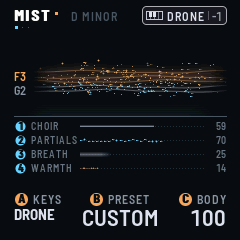
Under the waterline, four strata show the drone’s mix: CHOIR, PARTIALS and BREATH, each drawn as its own thing in the river, and WARMTH, as embers in lamp light. K1–K4 set them. The one you turn lights up.
At the top right of the river, only what is on, out of sight elsewhere: SEQ (ice while the sequence runs, slate while it is stopped) or REC (lamp, while it records); ARP, or ARP LATCH, while the arpeggio has notes (slate while it waits); LFO and three dots, one for each, ice while it runs; SWELL (lamp) while it swells.
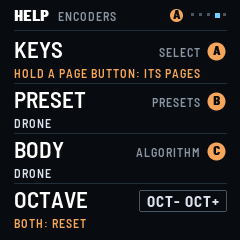
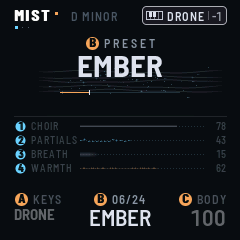
At the bottom, the three left encoders, the same on every page: KEYS (SELECT), what the keys play; the drone’s preset (PRESETS), its name large and its number over it, 07/24, or PRESET over CUSTOM; and its BODY (ALGORITHM).
The badgesLink to this section
Every setting on screen wears the badge of the control that turns it. A blue disc numbered 1–4 ( ) is K1–K4, the four encoders at the top right. An orange disc A, B or C ( ) is SELECT, PRESETS or ALGORITHM, the three encoders on the left. Turning one of these shows its value large for a moment, on any page.
When an LFO moves a setting, its gauge shows a small ice-blue mark where the LFO has it now; the value and its own mark stay where you put them. See The LFOs.
The headerLink to this section
On the play page the header shows the scene: its name, as large as it fits (a long one smaller: its sixteen characters always fit), an amber dot while the sound differs from the scene’s, then the key (D MINOR), once you set a scale or a chord and if there is room. Elsewhere, the page’s name; SCENES adds CHANGED, in lamp, while the sound differs. FRASIL’s name stays on the logo screen. Under the title, a dot for each page of its button (those GLINT’s SEQ hides not counted), the one on screen ice; HOME’s three are SOUND, MIXER and the logo.
At the right, the keys’ badge: a small keyboard, what the keys do and the octave, in the mode’s colour: DRONE white, BASS orange, and for GLINT, in ice blue, what its keys do: GLINT (SEQ OFF: each key its glint), ARP (they feed the arpeggio), SEQ (they transpose the sequence), or REC, in orange, while they write into it. Its frame is solid while the notes latch, dotted while they sound only as long as their key is held: for DRONE and BASS, GLOBAL’s KEY MODE (LATCH or HOLD); for GLINT, the arpeggio (on and latched, or not).
Beside it: FREEZE while the cloud is held (a flake of ice beside a long name), an amber dot while the processor lightens the sound, and on GLOBAL the processor’s load. When it is full, the least important items step aside.
For a moment the header gives way to a message (STORED 03 ABYSS, FILTER > LFO 2); to PLAY held (RELEASE ALL or RESTORE, a line of progress under it); on the play page and SCENES, to a scene’s MORPH (an arrow, the scene’s name, a line for how far it has come; elsewhere, only the line, under the page’s name); and, while EDIT is held, to COMPARE · AS SAVED.
A warning takes the whole screen until you press SEL: something did not happen, or wants your hand (STOP FIRST, NOT RESTORED, NOT STORED, MIDI LEARN: TURN ONE FIRST), or what a restore from USB did (RESTORED). Its one button, OK, is SEL, the only light left on. SEL only closes it: you are back where you were, the lights too. Meanwhile the keys and MIDI play; the other buttons and the encoders wait. Everywhere a question is asked, SEL is yes (OK, store, restore) and FX is no (cancel), and only the buttons that answer are lit.
The mixerLink to this section
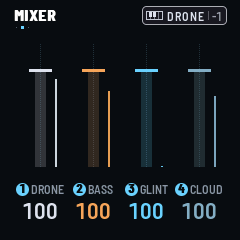
Press HOME on the play page: a fader for each track, DRONE, BASS, GLINT, and CLOUD, the reverb’s return, each in its colour, with the track’s meter beside it, live. K1–K4 move them. 100 is the level as it is (a mark on the track), up to 127. The faders are the tracks’ levels in the mix, after their own sound: DRONE and GLINT take what they send into the cloud down with them. HOME again opens the logo screen.
The logo screenLink to this section
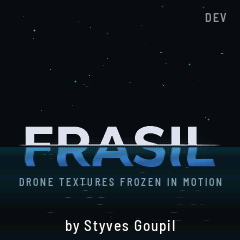
HOME’s third screen: the logo, alive, the version at the top right, the sky over two thirds of the screen. Over the waterline, granules of frasil drift like stars: they follow what plays (faster with MOTION), pressure warms them, GLINT notes sparkle among them. Under it, the water: night blue, slow swells of light passing through it, the sky’s light on it in short strokes that come and go, and the letters in it, deep blue, swaying. FREEZE stills it all.
PLAY and the octave buttons leave it open, so you can play from it. HOME again goes back to the play page.
HelpLink to this section
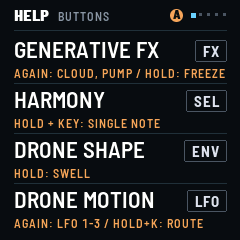
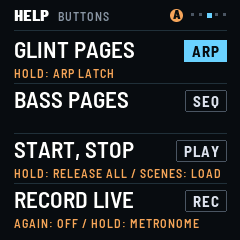
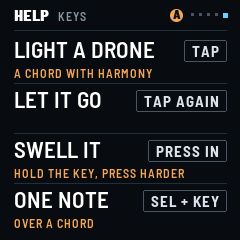
Hold HOME: the help screen opens and stays, on the page with the button of the page you were on. Turn SELECT for its five pages: the buttons in the panel’s order (three pages), the encoders, the keys. Each line gives a control’s job, then the control, and under it, in amber, what it does again, held, or with something else. Tap HOME to close it and go back where you were.