
Guide 0607 / 2122
The keys
How the keys play the selected track: in the scale or not, notes or chords, latched or held, stacked or swapped.
KEYS · For the selected track
KEYS · For the selected track
Tap HOMEPATCH on the play page: KEYS. Its four settings are the selected track’s; each track keeps its own.
MIDI has its own HARMONY and NOTES, and no LATCH or STACK (see MIDI OUT).
The LEAD has HARMONY and NOTES too, and no LATCH or STACK: its keys sound only while held (see LEAD).
| Page | K1 | K2 | K3 | K4 |
|---|---|---|---|---|
| KEYS | HARMONY OFF, ON | NOTES SINGLE NOTE, CHORD | LATCH OFF, ON | STACK OFF, ON |
HARMONYLink to this section
ON, the keys follow HARMONY: in the scale, and chords if NOTES says so. OFF, each key plays its own note, chromatic.
NOTESLink to this section
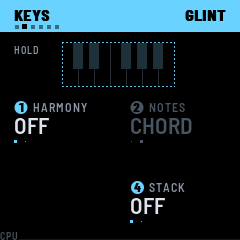
From any page, FADER BANK switches NOTES for the selected track. SINGLE NOTE: one note a key. CHORD: the chord CHORD builds on it. CHORD needs HARMONY ON: with HARMONY OFF it stays in slate, and turning NOTES to CHORD turns HARMONY ON too. CHORD can always be chosen. Where the keys still play one note, it is in slate and says why under it: GLINT with SEQUENCE ON, (NOT ON SEQ); the bass, one note at a time, (ARP ONLY): its chords only through its arpeggio; the LEAD in MONO, (POLY ONLY). The drone’s turns, its sequence on or off.
Hold SEL on its own, then let go: NOTES of the selected track flips between SINGLE NOTE and CHORD (to CHORD turns HARMONY ON too). It does nothing if you pressed a key or turned a K while holding SEL.
LATCHLink to this section
ON, a tap holds the note until you tap it again. OFF, it sounds while the key is down. From any page, hold FADER BANK to switch it.
Turned OFF, it lets that track’s latched notes go, so it takes a second turn the same way within 2 seconds (LATCH, TURN AGAIN smaller beside it).
GLINT has none: its keys sound while down, and a key lets go what still rings. With ARP ON, the arpeggio’s own LATCH (ARP II) holds them.
STACKLink to this section
ON, a new key or chord joins what is latched. OFF, it takes its place, keys pressed together staying together.
Hold SEQ to turn it from any page. The SEQ and ARP pages say it at their foot: STACK ON (HOLD SEQ) in amber, or STACK OFF (HOLD SEQ).
On the screenLink to this section
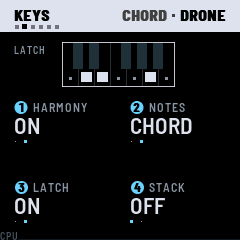
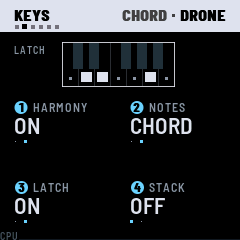
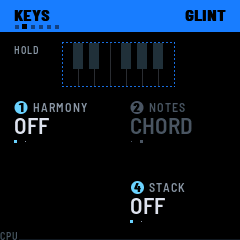
A choice that doesn’t apply stays where it is, in slate. The strip draws an octave of keys as a key plays now: the scale’s dots with HARMONY ON, a chord’s notes with CHORD, a solid outline for LATCH, a dotted one for HOLD, the word beside it, and under the word NOTES or CHORDS while STACK is ON.
Where they startLink to this section
| Track | HARMONY | NOTES | LATCH | STACK | Plays |
|---|---|---|---|---|---|
| DRONE | ON | CHORD | ON | OFF | SEQUENCE OFF |
| GLINT | ON | SINGLE NOTE | none | OFF | ARP ON |
| BASS | ON | SINGLE NOTE | ON | OFF | SEQUENCE OFF |
| MIDI | OFF | SINGLE NOTE | none | none | SEQUENCE OFF |
| LEAD | OFF | SINGLE NOTE | none | none | no ARP, no SEQ |
KEYS are the FM-1SMK-37’s, not a scene’s: kept through power-off, and a scene you load leaves them as they are. Only NEW SHARD puts them back to these. ARP and SEQUENCE are the scene’s. MIDI and the LEAD have only HARMONY and NOTES. Notes coming in on the drones’ channel take the DRONE’s (see MIDI). LATCH takes over from the KEY MODE of earlier FRASILs: its LATCH or HOLD becomes the drone’s and the bass’s LATCH.