
Guide 1112 / 2122
LEAD
A warm voice for melodies over the drone. Its keys sound only while you hold them.
LEAD · Then EDIT, ENV
LEAD · Then PARA, CHORD
Playing the LEADLink to this section
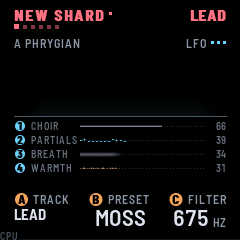
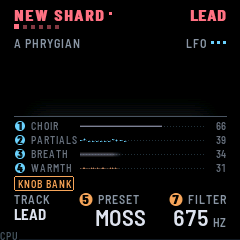
Turn SELECTK6 (TRACK) one step past BASS, to LEAD. The keys play the LEAD and the header turns rose.
The LEAD is for melodies. It has two oscillators, a soft drive, a filter with its own envelope and its own delay.
| Gesture | What happens |
|---|---|
| Hold a key | Its note sounds while you hold it |
| Let it go | The note fades over RELEASE |
| Tap harder | Louder, and the filter opens more |
| Hold a key and press | Louder and brighter while you press |
| Move the pitch wheel | The note bends, up to two semitones up or down, whatever track is selected |
| Move the mod wheel | Vibrato, more as you push it |
Each key sounds only while held. Nothing latches. By default each plays its own note.
The LEAD has no arpeggio and no sequence. ARP and SEQ say NOT AVAILABLE FOR LEAD. RECSEQ REC says NOT FOR LEAD.
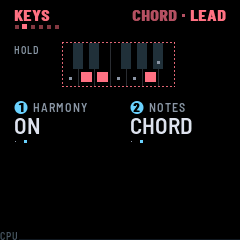
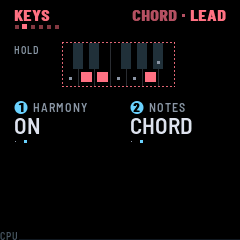
KEYS (HOMEPATCH’s second page) gives the LEAD two settings: K1 HARMONY, K2 NOTES. K3 and K4 stay empty. With HARMONY ON, a key’s note follows the scale. With NOTES on CHORD, each key plays the chord CHORD builds on it. CHORD needs HARMONY: turning NOTES to CHORD turns HARMONY ON too.
Chords play only in POLY. In MONO, CHORD shows in slate with (POLY ONLY) under it. The header says CHORD · LEAD while the LEAD plays chords. Hold SELSCALE and tap a key: one note.
KEYS are kept with the FM-1SMK-37’s settings, not a scene’s. NEW SHARD sets them back to HARMONY OFF and SINGLE NOTE.
MONO and POLYLink to this section
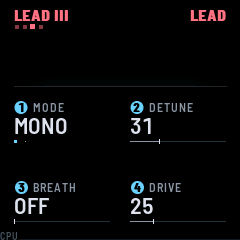
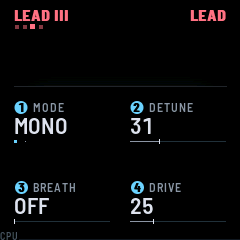
MODE (LEAD III, K1) sets how notes play together.
- MONO One note at a time. Press a new key while you hold another: the pitch glides to the new note (GLIDE). The note is not struck again. Let the new key go: the LEAD goes back to the key you still hold.
- POLY Each key plays its own note, so you can play chords. When every voice is busy, the quietest note that is fading out gives way. Each voice glides from its last note, as GLIDE says.
Changing MODE stops the notes that are playing.
Its pagesLink to this section
With LEAD selected: EDITPARA opens its sound (LEAD I, LEAD II, LEAD III, LEAD DELAY), ENVCHORD its two envelopes. ALGORITHMK7 (C) turns its FILTER and PRESETSK5 (B) its PRESET, from any page.
Hold EDITPARA and press a black key on the far leftjust above the lowest F: F♯ for LEAD I, G♯ for LEAD II (again: LEAD III), A♯ for LEAD DELAY.
| Page | K1 | K2 | K3 | K4 |
|---|---|---|---|---|
| LEAD I EDITPARA | PRESET | WAVE SAW, SQUARE, PULSE, WHISTLE | FILTER 60 Hz to 12 kHz | RESONANCE |
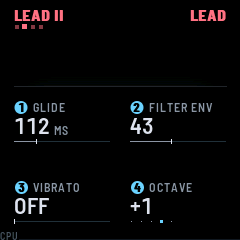
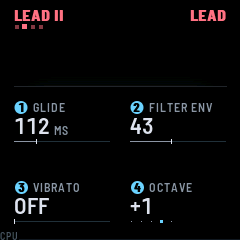
| LEAD II EDITPARA | GLIDE OFF to 2 s | FILTER ENV up to 5 octaves | VIBRATO | OCTAVE −2 to +2 |
| LEAD III EDITPARA | MODE MONO, POLY | DETUNE | BREATH | DRIVE |
| LEAD DELAY EDITPARA | TIME 1/32 to 1/2 | FEEDBACK | MIX | SPACE reverb send |
| LEAD ADSR ENVCHORD | ATTACK OCT−OCTAVE− held: SHAPE | DECAY | SUSTAIN | RELEASE |
| LEAD FILTER ENVCHORD | F.ATTACK OCT−OCTAVE− held: SHAPE | F.DECAY | F.SUSTAIN | F.RELEASE |
| LEAD ARP, LEAD SEQ ARP, SEQ | NOT AVAILABLE FOR LEAD |
The soundLink to this section
- WAVE SAW is bright. SQUARE, in the middle, is hollow. Past it, the pulse gets thinner. Past PULSE is WHISTLE: a whistled tone with some breath in it. Each WHISTLE note slides up into its pitch.
- DETUNE Tunes the second oscillator up to 25 cents higher: a slow beating, then a chorus.
- BREATH Adds noise before the filter, on any WAVE.
- DRIVE A soft distortion. The level stays about the same.
- FILTER A low-pass. Higher notes and harder taps open it more. RESONANCE adds a peak.
- VIBRATO A pitch wobble on every note. OFF at 0.
- OCTAVE Moves every LEAD note, −2 to +2 octaves.
Two envelopesLink to this section
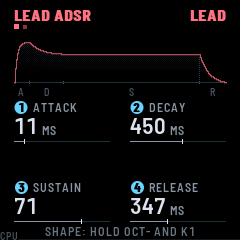
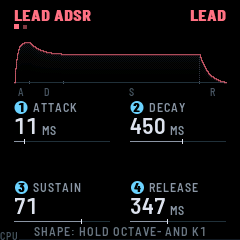
LEAD ADSR (ENVCHORD) shapes each note’s level: ATTACK, DECAY to SUSTAIN while you hold the key, RELEASE after you let it go.
ENVCHORD again: LEAD FILTER, the filter’s own envelope, F.ATTACK to F.RELEASE. FILTER ENV (LEAD II, K2) sets how far it opens the filter, up to five octaves. At 0, the filter stays where FILTER puts it.
Both pages draw their curve. Set them the same, and the sound gets brighter as it gets louder.
Hold OCT−OCTAVE− and turn K1 on either page for its ATTACK’s shape: CURVE, or LINE, a straight rise.
LEAD DELAYLink to this section
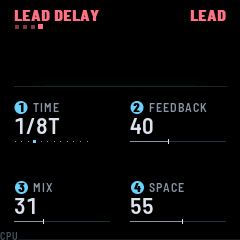
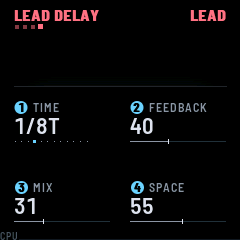
The LEAD’s own echo. The echoes bounce between left and right; the first one is on the left. Each echo is a little darker than the one before.
TIME is on the beat (MIDI clock, else TEMPO), from 1/32 to 1/2, with triplets and dotted values. A time longer than half a second is halved, and stays on the beat. FEEDBACK sets how many echoes come back, MIX how loud they are.
SPACE sends the LEAD into the reverb, its echoes too, even with MIX at 0. CLOUD SEND’s K4 is the same SPACE.
PresetsLink to this section
Turn PRESETSK5 (B) on any page, or PRESET (LEAD I, K1): the LEAD’s presets in the name grid. You hear each as you stop on it. SELSCALE keeps it, FX goes back. Some are MONO, some POLY.
A preset sets every LEAD setting but its level. Store your own with SAVEBT: WHAT LEAD PRESET (see your presets). They come after the factory ones.
In the mixLink to this section
The LEAD’s level is the MIXER’s K4 (HOMEPATCH’s third page). 100 is unity, up to 127. The LEAD has no pan.
It plays over everything. PUMP and MASTER FILTER leave it alone, and so does LOFI’s sound. SPEED still moves its pitch. SINK, MASTER EQ and MASTERING act on it.
Each scene keeps its LEAD: its sound and its level. Older scenes, the factory scenes and NEW SHARD start with the LEAD’s default sound. A shard keeps its LEAD too.
LFOs can move the LEAD’s settings, all but PRESET, MODE and OCTAVE (see The LFOs).
MIDI notes play it on LEAD CH, OFF at first (see MIDI). MIDI learn doesn’t take its settings (NOT ON LEAD).
A few to tryLink to this section
- MIX at 0, SPACE up: the melody stays dry, and the reverb surrounds it.
- MONO, GLIDE up, then play legato: the notes slide into each other.
- FILTER low, FILTER ENV up, F.SUSTAIN low: each note starts bright, then gets darker.