
Guide 1213 / 2122
MIDI OUT
The fifth track. Its keys play an instrument on your computer, over USB, while FRASIL plays on.The fifth track. Its keys play an instrument on your computer, over USB and the MIDI OUT jack, while FRASIL plays on.
MIDI · Then EDIT
MIDI · Then PARA
Playing a computer’s instrumentLink to this section
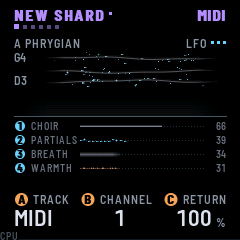
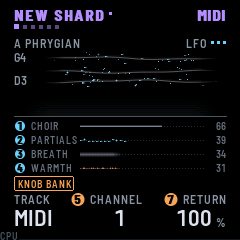
Turn SELECTK6 (TRACK) one step past LEAD, to MIDI. Or tap KNOB BANK, or pad 13. The header turns violet. The keys now send MIDI notes to your computer. They play nothing on the FM-1SMK-37 itself.
What already plays keeps playing. Latch a drone first, then select MIDI and play your DAW’s instrument over it. FRASIL’s sound and the instrument’s go into the same recording.
| Gesture | What goes out |
|---|---|
| Hold a key | A note on, as hard as you tap |
| Let it go | Its note off |
| Hold a key and press | Pressure (aftertouch), as PRESSURE says |
| Move the pitch wheel | Pitch bend |
| Move the mod wheel | CC 1 |
| Press the pedal | CC 64, sustain |
With HARMONY OFF, each key plays its own note. A note always ends on the channel and the octave it started on, even if you change them while you hold it.
MIDI has its own arpeggio and sequence (below). It has no envelope: ENVCHORD says NOT AVAILABLE FOR MIDI. KEYS has its own HARMONY and NOTES, below.
MIDI OUTLink to this section
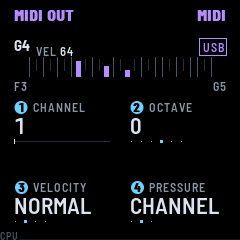
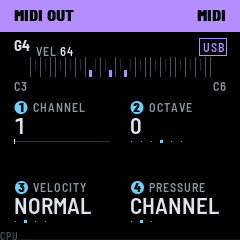
With MIDI selected, EDITPARA opens MIDI OUT. PRESETSK5 (B) turns its CHANNEL from any page. ALGORITHMK7 (C) turns RETURN: the level of the sound coming back from the computer (below).
The strip shows the notes the computer gets, each note of a chord too. The ones you hold rise as you press. Under them, the range the keys play. At the top, the last note sent and its velocity, and USB: violet while a computer listens, grey when none does.
| Page | K1 | K2 | K3 | K4 |
|---|---|---|---|---|
| MIDI OUT EDITPARA | CHANNEL 1 to 16 | OCTAVE −3 to +2 | VELOCITY SOFT, NORMAL, HARD, FIXED | PRESSURE OFF, CHANNEL, POLY |
| KEYS HOMEPATCH, twice | HARMONY OFF, ON | NOTES SINGLE NOTE, CHORD | ||
| MIDI ENV ENVCHORD | NOT AVAILABLE FOR MIDI |
- HARMONY OFF, the default: each key sends its own note, as played. ON: the key sends the scale’s note at or below it.
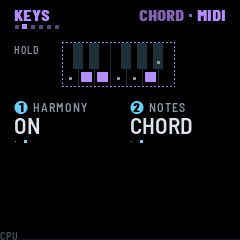
- NOTES SINGLE NOTE, or CHORD: the chord CHORD builds on that note (HARMONY’s root, scale, chord and voicing), all its notes sent on MIDI’s channel at the key’s velocity, each ended when you let go. NOTES to CHORD with HARMONY OFF turns HARMONY ON too. Hold SELSCALE and tap a key for one note. With SEQUENCE ON, a key is one note: CHORD shows in slate, (NOT ON SEQ). With ARP ON, a chord’s notes go into the arpeggio. While MIDI plays chords, the header says CHORD · MIDI. K3 and K4 are empty: the keys sound only while held. FADER BANK turns NOTES from any page. HARMONY and NOTES are kept like the other tracks’ KEYS.
- CHANNEL The MIDI channel the notes go out on. Most instruments listen to every channel. Pick one to play a single part of a multitimbral instrument.
- OCTAVE MIDI has its own octave. OCT−OCTAVE− and OCT+OCTAVE+ move it while MIDI is selected; leave MIDI and the drones’ octave comes back. At 0, the keys play F3 to G5C3 to C6.
- VELOCITY NORMAL sends how hard you tap. SOFT gives more for a light touch, HARD less. FIXED always sends 100.
- PRESSURE CHANNEL sends the hardest key’s pressure as channel aftertouch: most instruments take it. POLY sends each key’s own, for instruments that take polyphonic aftertouch. OFF sends none. The SMK-37’s keys have no pressure: they send none.
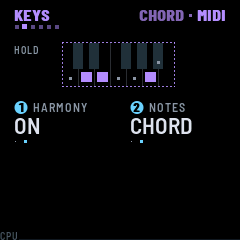
KEYS on MIDI, HARMONY ON and NOTES CHORD: each key sends the chord CHORD builds on its note. The header says CHORD · MIDI.
ARP and SEQLink to this section
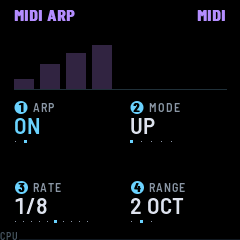
MIDI has an arpeggio and a sequence of its own, as GLINT has: the same pages, on FRASIL’s beat (TEMPO, or the MIDI clock FRASIL follows). Their notes go out on CHANNEL; nothing sounds on the FM-1SMK-37.
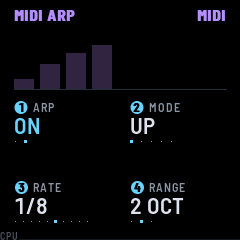
ARP: ON, MODE, RATE, RANGE; ARP II: CHANCE, LATCH, GATE (5 to 100 %, then LEGATO), SWING; ARP III: VELOCITY (AS PLAYED, or 1 to 127). Hold a chord: its notes go out one after another. With LATCH, they go on after you let go. Hold ARP: LATCH on or off.
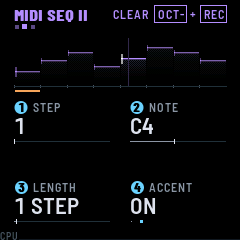
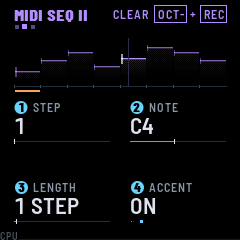
SEQ: ON, SEQ LENGTH, RATE, GATE; SEQ II: STEP, NOTE, LENGTH, ACCENT; SEQ III: CHANCE, TRANSPOSE, UNDO TAKE. PLAYSEQ PLAY starts it from the top with FRASIL’s sequences, and stops it with them.
RECSEQ REC on MIDI records into it: LIVE, then STEP, then off. On STEP, each key goes at STEP, LENGTH long, then STEP moves on. On LIVE, while it plays, each key goes on the step nearest the playhead, as long as you hold it. OCT−OCTAVE− and RECSEQ REC on its pages: CLEAR. Its steps and settings are kept with the scene you store.
Every note they send ends: STOP, RELEASE ALL and CUT stop them, and a note always ends on its own channel.
RETURN, the sound coming backLink to this section
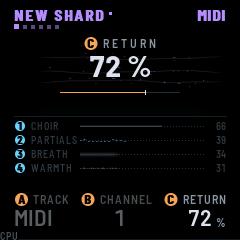
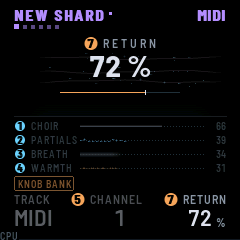
When your DAW plays its instrument out through the FM-1SMK-37 (its audio output set to FRASIL FM-1FRASIL FM-1 SMK-37), you hear it in the speaker and the headphones with FRASIL. With MIDI selected, ALGORITHMK7 (C) sets its level, from 0 to 100 % (as sent). It is kept with the FM-1SMK-37’s settings. With no sound coming back, it does nothing.
CLOCK OUTLink to this section
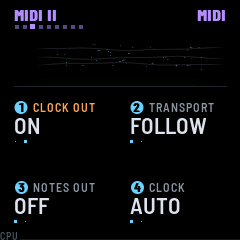
GLOGLOBE › MIDI II: CLOCK OUT, OFF at first. ON, FRASIL sends MIDI clock (24 a beat, at TEMPO or the clock it follows), Start as PLAYSEQ PLAY starts the sequences, Stop as they stop. Your DAW can follow it.
K2, TRANSPORT, and K4, CLOCK, are for the clock that comes in (see MIDI).
NOTES OUTLink to this section
GLOGLOBE › MIDI II, K3: NOTES OUT, OFF at first. ON, the notes FRASIL plays by itself go out too, over USB and the MIDI OUT jack, for your DAW to record:
| Channel | What goes out |
|---|---|
| 14 | GLINT’s arpeggio and sequence |
| 15 | SPARKLE’s glints |
| 16 | The bass’s arpeggio and sequence, PULSE’s strikes too |
Each note goes out as it sounds: its octave, its velocity, its length. FRASIL’s sound doesn’t change. Your keys, the drones and the LEAD stay out of it. STOP, RELEASE ALL, CUT, a scene loaded and NOTES OUT turned OFF end every note it sent.
In Ableton Live, a MIDI track with MIDI From on FRASIL FM-1FRASIL FM-1 SMK-37, channel 14, records GLINT’s notes. FRASIL’s tracks listen on channels 1 to 3 at first: these notes, sent back, play nothing.
Setting up your computerLink to this section
Connect the FM-1SMK-37 over USB. It shows up twice: as an audio input, FRASIL’s sound, and as a MIDI device. Both are named FRASIL FM-1FRASIL FM-1 SMK-37.
- Logic Pro Create a software instrument track and select it: the keys play it. Logic takes notes from every MIDI input and channel. To record FRASIL too, choose FRASIL FM-1FRASIL FM-1 SMK-37 as the audio input (Settings, Audio), then add an audio track on inputs 1 and 2.
- Ableton Live In Settings, Link, Tempo & MIDI, turn on Track for the FRASIL FM-1FRASIL FM-1 SMK-37 input. On a MIDI track with an instrument, set MIDI From to it, All Channels, and arm the track or set Monitor to In.
Don’t send the notes back to FRASIL. If a DAW track sends MIDI out to FRASIL FM-1FRASIL FM-1 SMK-37 while you play, the drones play your notes too. Point that track elsewhere, or set DRONE CH to OFF on the MIDI page.
The SMK-37’s MIDI OUT jack sends the same notes, the wheels and the pedal: a hardware synth plays them, with or without a computer.
What is keptLink to this section
CHANNEL, OCTAVE, VELOCITY, PRESSURE, RETURN, CLOCK OUT, TRANSPORT and NOTES OUT are kept with the FM-1SMK-37’s settings. MIDI’s arpeggio and sequence are kept with each scene you store. At power-on the DRONE is selected again.
MIDI is not part of a shard. PERFORM’s LIVE doesn’t hear it: your DAW records it.
Pad 13, in violet, selects MIDI. Hold it: the notes it sent end, and your instrument gets All Notes Off (CC 123).