
Guide 03 / 22
The SMK-37
FRASIL on the M-VAVE SMK-37: the FM-1’s controls under the SMK-37’s own names, and what its panel adds.
Three modelsLink to this section
The SMK-37 Elite, the SMK-37 Pro and the MKE-P37 are the same keyboard under three names. FRASIL is the same on all
three, and this chapter is about all three: only the package differs. The Elite takes
frasil-smk37-elite-X.Y.Z.fwsc, the Pro frasil-smk37-pro-X.Y.Z.fwsc, the MKE-P37
frasil-smk37-mke-X.Y.Z.fwsc. The Elite’s is tested. The Pro’s and the MKE-P37’s are not tested yet:
tell us if they work.
On each one, back the keyboard up first, before the first install: Install shows how.
The namesLink to this section
FRASIL does the same things on both instruments. The SMK-37 prints other names on its panel, and its screens use them. This guide uses them too.
| FM-1 | SMK-37 |
|---|---|
| SEL | SCALE |
| ENV | CHORD |
| LFO | NOTE REPEAT |
| EDIT | PARA |
| GLO | GLOBE |
| HOME | PATCH |
| SAVE | BT |
| PLAY | SEQ PLAY |
| REC | SEQ REC |
| OCT− | OCTAVE− |
| OCT+ | OCTAVE+ |
| SELECT | K6 |
| PRESETS | K5 |
| ALGORITHM | K7 |
| MASTER | K8 |
| FX ARP SEQ K1–K4 | The same |
On the screens, a setting turned by K6, K5 or K7 wears that knob’s number in an orange disc: 6, 5 or 7. K1 to K4 wear theirs in blue, as on the FM-1.
The keysLink to this section
The SMK-37 has 37 keys. The middle 27, from the lowest F to the G five keys from the top, are the FM-1’s keys. They do everything this guide says the keys do. At octave −1 they play F2 to G4, as on the FM-1.
The five keys below them and the five above them play notes only. Five of them sound at once, at most. While BT or PARA is held, they do nothing.
The keys feel how hard you strike them. They have no pressure. To swell the drones, hold CHORD. Or turn SWELL: FX, K1.
The keys have no lights.
K8: MASTERLink to this section
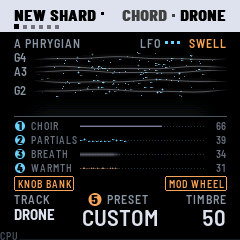
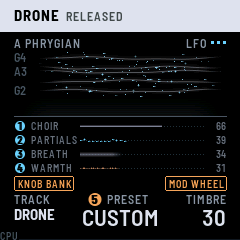
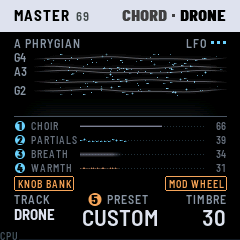
K8 is the volume. Each step shows the level a moment, in the header.
The level is not saved. Each time you switch the SMK-37 on, it starts at half.
The fadersLink to this section
Faders 1 to 4 set MIXER’s four levels: DRONE, BASS, GLINT and LEAD.
A fader acts once you move it. Until then, the levels a scene brings stay as they are.
The wheelsLink to this section
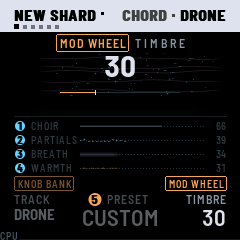
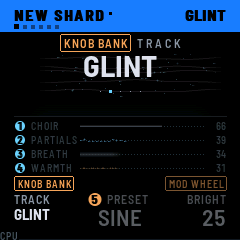
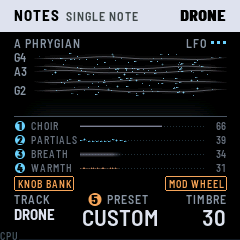
The mod wheel sets the selected track’s K7 setting: the drone’s TIMBRE, GLINT’s BRIGHT, the bass’s FILTER. The screen shows its value large. On the LEAD, the mod wheel adds vibrato.
On the play page, MOD WHEEL sits over the setting it moves, and KNOB BANK over TRACK.
The pitch wheel bends the LEAD, up to two semitones up or down. It does this whatever track is selected, but MIDI.
On MIDI, the wheels go to your computer: the pitch wheel as pitch bend, the mod wheel as CC 1.
A wheel acts once you move it.
KNOB BANK, FADER BANK and the arrowsLink to this section
| Button | Tapped · held |
|---|---|
| KNOB BANK | The next track: DRONE, GLINT, BASS, LEAD, MIDI, then DRONE again. The same as K6 turned one step. Its key sits over TRACK on the play page |
| FADER BANK | The selected track’s KEYS NOTES: SINGLE NOTE or CHORD. CHORD with HARMONY off turns HARMONY on. Hold: the track’s LATCH, on or off. Off, its notes let go. On the LEAD, NOTES only: it has no LATCH |
| < > | The page before, the page after, among the current button’s pages, round. The same as holding the button and turning K6. In a name: the cursor |
The padsLink to this section
FRASIL uses 11 of the 16 pads, as buttons: how hard you hit or press them changes nothing. Pads 1 to 8 are the top row, from the left. Pads 9 to 16 are the bottom row.
| Pad | What it does |
|---|---|
| 1 · 2 | CANCEL in red, OK in green, whenever the screen asks you something. A warning: OK alone. The header shows the two words in their colours. Dark the rest of the time |
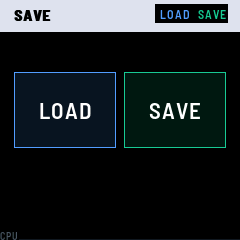
| 1 · 2 on BT | LOAD in blue and SAVE in green: BT’s two choices. Then CANCEL and SAVE. On SCENES: back, and LOAD |
| 6 · 7 · 8 | LFO 1, 2 and 3, in blue, cyan and pink. The light follows the LFO’s wave, and stays dark while that LFO is off. Tap: its page. Tap again: its TARGETS. Hold and turn K1–K4: that setting onto that LFO |
| 9 · 10 · 11 · 12 · 13 | DRONE, GLINT, BASS, LEAD and MIDI, each in its track’s colour, the selected one brighter. Tap: that track. Tap the selected one: its PARA pages, the next one at each tap. Hold: that track’s notes let go (MIDI: the notes it sent end, and All Notes Off goes out) |
| 16 | Hold it and turn K1–K4: that setting’s LFO AMOUNT, as when SCALE is held. Dim white while an LFO is on |
| 3 to 5 · 14 · 15 | Nothing yet |
While the screen asks something, pads 6 to 16 wait.
Writing a nameLink to this section
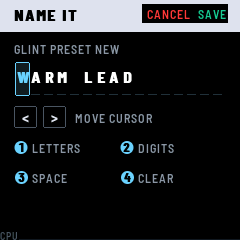
On NAME IT, < and > move the cursor. K1 picks a letter. K2 picks a digit. K3 puts a space. K4 clears the whole name.
Pad 2, BT or SCALE keeps the name. Pad 1 or FX goes back, the name as it was. OCTAVE− and OCTAVE+ do nothing there.
The pedalLink to this section
The pedal sends sustain (CC 64) on MIDI OUT. FRASIL’s own tracks don’t use it yet.
What else differsLink to this section
- MIDI comes in over USB only. The SMK-37’s TRS jack is a MIDI output: it sends what MIDI OUT sends.
- The buttons light, or glow dim. There is no third level.
- GLINT is a deeper blue on the SMK-37’s screen.
- Hold OCTAVE− and OCTAVE+ for 10 seconds: UPDATE MODE. Hold SEQ REC while you switch the SMK-37 on: UPDATE MODE too.